Edutopia has so many great articles for teachers. Here is one that give you some ideas to increase student motivation. Just click the title below to go to the article. Enjoy 🙂
4 Strategies to Increase Student Motivation in Mid-Semester
By Tanner Jones
October 10, 2023
Increasing Student Motivation from Edutopia
11 10 2023Comments : Leave a Comment »
Categories : Motivation
Computational Thinking in STEM Activities
18 03 2019I’ve been working with 7th and 8th graders on various STEM projects and having a blast! It is so much fun to watch kids excited about learning and utilizing computational thinking in order to accomplish a given task. The latest project we worked on was a volleyball machine. The project can be found at https://www.sciencebuddies.org/
We gave them no assistance – this video was it – and the designs they came up with were phenomenal. The excitement when their designs worked was contagious. The collaboration in helping one another solve a problem with their design was what every teacher loves to see. The fact that the activity culminates in a competition motivated them even more. And for the teacher .. besides generating excitement among their students it satisfies various math and science standards.
There are so many valuable sites with projects that will excite students and make them THINK! This is just one of them. Enjoy 🙂
Comments : Leave a Comment »
Categories : Art, Math, Motivation, Science
Binumi – a Video Project Tool
19 01 2018Binumi is an AWESOME tool for digital storytelling video projects. There is a free version that should be adequate for your needs. It has a huge library of video clips as well as sound files that can easily be dragged and dropped to your storyline. Adding text as well as your own files are easily done but if you get stuck there is a short tutorial right within your project screen – just look for the i which gives you an overview of the editor. I’ve included a short video to give you an introduction and if you have any questions contact me. I’d be more than happy to help! Go to https://www.binumi.com/ and create your free account Enjoy!
Comments : Leave a Comment »
Categories : Video, Web 2.0 Tools
Writing Reviser – a Google AddOn
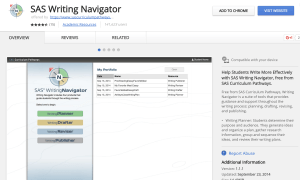
29 03 2017Back in 2014, I wrote about SAS Curriculum Pathways and the many interactive tools and lessons available for free. They are still there but now they are moving to Chrome!!! The Writing Navigator is a tool AND app that helps students move from planning to drafting to revising to publishing. You will have to create an account but its free.
And NOW, SAS has included an add-on to Google Docs for the Writing Reviser! Any teacher I’ve shown this tool to has been blown away!
To get it, go to Tools, Get Add-ons in a Google Doc: 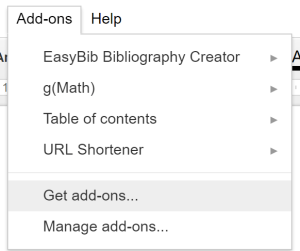
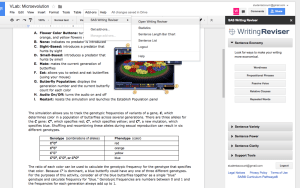
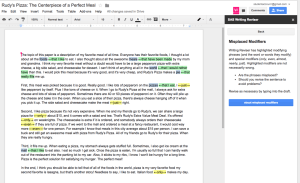
When you want to use the Writing Reviser just go back to your AddOn tab and Open the Addon! I can’t even tell you how much is available with this add-on. I could not do it justice. Here’s some images but you really need to try it to see its power.
Sentence Economy Information
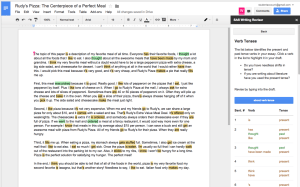
Verb Tenses
Misplaced Modifiers
Enjoy!
Comments : Leave a Comment »
Categories : Google Apps, Internet Tools, Websites for your Classroom
SWAY an online FREE Presentation Tool
11 12 2016Have you ever used SWAY? It is an incredible FREE online tool that can be used to create presentations/lessons. Since it is strictly online, it works well with Chromebooks. A VERY cool thing about SWAY is that it intuitively offers content based on the words you place on your “cards”. The content offered is Creative Commons – You can embed YouTube, Geogebra, Tweets, Google Maps…
The example above was created by me and all content was in the Sway library for me so I never had to leave the site.
Sways can be private or public so sharing is encouraged! The following example is one that I found – I chose it because it gives some really good ideas. If you click on the … in the right corner, you can open full size in a new tab. Enjoy!
Comments : Leave a Comment »
Categories : Web 2.0 Tools
New to Kahoot!
3 11 2016Hi all!
I know many of you use Pear Deck, Quizizz and Kahoot in your classrooms. I want to share what’s new with Kahoot!
It’s called Jumble and you need to move your tiles to put them in order. There are several example games ready for you to use including a Word Jumble, Film Trivia, Halloween Fun, Political Jumble, and Build the Equation.
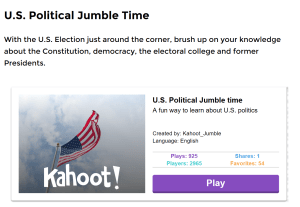
MATH TEACHERS – it seems as though we are often left out 😦 BUT.. you are going to LOVE creating equations through jumbling! Click on the following link to learn more about Jumble. Scroll down to find the example games. 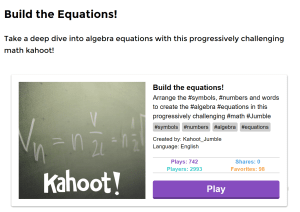 Have some fun! CREATE and SHARE!!!
Comments : Leave a Comment »
Tags: engagement, Motivation
Categories : Art, Business, English, Health, LOTE, Math, Motivation, Music, Science, Social Studies, Web 2.0 Tools
Google Slides as a BackChannel
21 08 2016Hi all! – welcome back! Hope you had a relaxing summer!
As you know I’ve retired from the classroom but what some of you did not know is that I am still the director of MTRACT and am SO looking forward to working with you this year:) Please contact me (bknab@msd.k12.ny.us) with any ideas you may have for MTRACT course offerings!
It’s been a busy summer! I attended a CTLE workshop and will have all updated information posted on both this site as well as the MFT site this week.
Have you ever used TodaysMeet in a workshop or with your students? Did you know that Google Slides now includes a Presenter View that acts as a backchannel? What a great way to give your students the opportunity to ask questions as they watch a presentation. I’ve attached a video to give you a better idea as well as a HOW TO. Enjoy and have a GREAT year!
Comments : Leave a Comment »
Categories : Google Apps, Websites for your Classroom
SAS Curriculum Pathways
21 04 2014Hi everyone,
Is spring in the air? It’s Saturday – end of our break and I’m really hoping that spring has kicked winter OUT and we will begin to enjoy the fruits of spring.
At Berner we were mesmerized by the assembly where a holocaust survivor reached out to our kids with the ultimate message to be aware, to get involved, to stand up to bullies. How many times have we heard “If you see something, say something”?
This lesson for middle school from SAS Curriculum Pathways on The Diary of Anne Frank seemed appropriate for me to share with you.
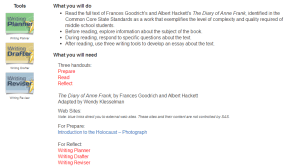 SAS supplies free tools to help students create:
The writing planner guides students through the “process of generating ideas and organizing them into a plan for writing”.
The writing drafter helps students “develop coherent sentences and paragraphs” from the organized ideas in their plan.
The writing reviser helps students revise their writing into their final project.
SAS provides FREE quality resources for ELA, Math, Science, Social Studies and Spanish. Email me for a username and password.
Comments : Leave a Comment »
Categories : English, LOTE, Math, Science, Social Studies, Uncategorized, Websites for your Classroom
Teachers Pay Teachers
23 01 2014Hi Everyone,
Sorry it’s been a while since my last post. My life has been very hectic of late. I was trying to think about what to write and remembered a teacher at my last workshop speaking of a site called teacherspayteachers. She said she found some really good lessons and it has actually given her some time off on weekends! So… I decided I’ll take a look and tell you about it.
You can sign up for free either as a buyer or buyer/seller with royalty payments or choose the premium account with no transaction fees and pay 59.95.
Grade levels start with Pre-K and ends with Post Secondary and Adult Ed.
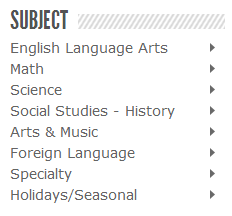
Take a look at the major subject areas to the left. The right arrows will take you to various topics (too numerous to mention). Specialty subjects include everything from business to health to speech and even ASL!
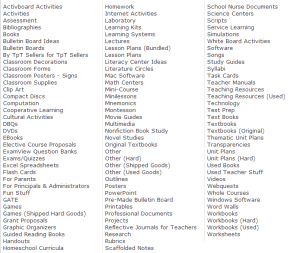
Types of resources include worksheets, lesson plans, DBQ’s, SMART Board activities, PowerPoint, assessments, ExamView question banks, webquests, clip art, used books and on and on…. see the image to the left or better yet, click here to visit the site and see for yourself see all it has to offer. Membership is free and I believe it’s certainly worth a look 🙂
Let me know what you think – have a great day!
Barbara
Comments : Leave a Comment »
Categories : Websites for your Classroom

 M-TRACT