More on Curriculum Pathways from Curriculum Pathways
|

|

|
|
|

|
More on Curriculum Pathways from Curriculum Pathways
|
|
|
|
|
|
Binumi is an AWESOME tool for digital storytelling video projects. There is a free version that should be adequate for your needs. It has a huge library of video clips as well as sound files that can easily be dragged and dropped to your storyline. Adding text as well as your own files are easily done but if you get stuck there is a short tutorial right within your project screen – just look for the i which gives you an overview of the editor. I’ve included a short video to give you an introduction and if you have any questions contact me. I’d be more than happy to help! Go to https://www.binumi.com/ and create your free account Enjoy!
Hi Everyone and welcome to SUMMER 🙂
I wanted to share my latest FREE find and thought you may enjoy taking a look as you relax this summer.
 It is a high school digital network that can be shared across schools nationwide. You don’t need to be a member to access the content and don’t have to worry about negative content. Check it out at https://www.fusfoo.com/ Mineola High School has several articles including the one featured “Seniors Speak: Reflections”
Check out our course page for updates on courses at MTRACT or other centers that have shared with me.
Have a terrific summer!
Barbara
Hi all,
The countdown has begun and you are almost HOME for the SUMMER! I know how busy this time of year can be for you so I wanted to share some resources created by Teacher Centers in partnership with NYSUT and WCNY upstate. These are fully on-demand Rents Review programs based on performance data gathered from the new math exams. Click the links below to visit the sites
Algebra II Stats and Probability:
Probability & Statistics (Ruling of Chance/ Sampling)
Geometry Modeling:
Enjoy and have a great weekend 🙂
Barbara
Back in 2014, I wrote about SAS Curriculum Pathways and the many interactive tools and lessons available for free. They are still there but now they are moving to Chrome!!! The Writing Navigator is a tool AND app that helps students move from planning to drafting to revising to publishing. You will have to create an account but its free.
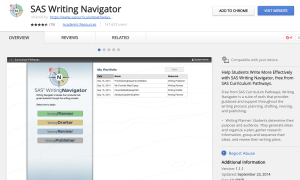
And NOW, SAS has included an add-on to Google Docs for the Writing Reviser! Any teacher I’ve shown this tool to has been blown away!
To get it, go to Tools, Get Add-ons in a Google Doc: 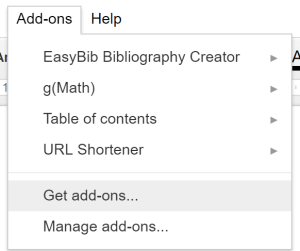
When you want to use the Writing Reviser just go back to your AddOn tab and Open the Addon! I can’t even tell you how much is available with this add-on. I could not do it justice. Here’s some images but you really need to try it to see its power.
Sentence Economy Information
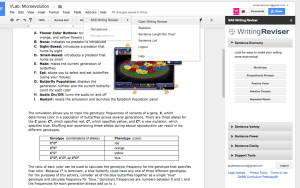
Verb Tenses

Misplaced Modifiers
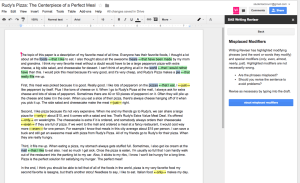
Enjoy!
Have you ever used SWAY? It is an incredible FREE online tool that can be used to create presentations/lessons. Since it is strictly online, it works well with Chromebooks. A VERY cool thing about SWAY is that it intuitively offers content based on the words you place on your “cards”. The content offered is Creative Commons – You can embed YouTube, Geogebra, Tweets, Google Maps…
The example above was created by me and all content was in the Sway library for me so I never had to leave the site.
Sways can be private or public so sharing is encouraged! The following example is one that I found – I chose it because it gives some really good ideas. If you click on the … in the right corner, you can open full size in a new tab. Enjoy!
Hi all!
I know many of you use Pear Deck, Quizizz and Kahoot in your classrooms. I want to share what’s new with Kahoot!
It’s called Jumble and you need to move your tiles to put them in order. There are several example games ready for you to use including a Word Jumble, Film Trivia, Halloween Fun, Political Jumble, and Build the Equation.
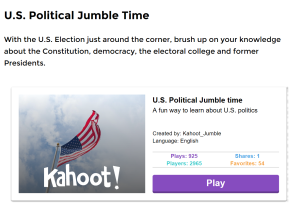
MATH TEACHERS – it seems as though we are often left out 😦 BUT.. you are going to LOVE creating equations through jumbling! Click on the following link to learn more about Jumble. Scroll down to find the example games. 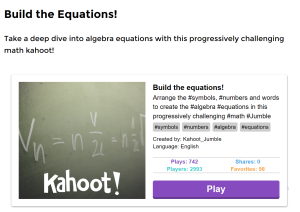 Have some fun! CREATE and SHARE!!!
Hi all
I have been playing with a really neat tool! I sure wish I’d known about this when I was in the classroom. It’s called Office Lens and is a free app available with Windows, iPhone and Android devices.
Watch the video to see how Office Lens works with Word and PowerPoint (also works well with OneNote)
I’ve placed links for the Windows Launch as well as iPhone and Android. Enjoy – let me know how you like it!
Windows Launch Link: https://www.microsoft.com/en-us/store/p/office-lens/9wzdncrfj3t8
Android and iPhone Information: https://blogs.office.com/2015/04/02/office-lens-comes-to-iphone-and-android/
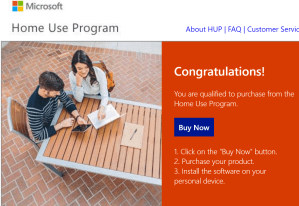
Did you know you are eligible to get Microsoft Office 2016 for only $9.95???
Go to the following URL:
http://www.microsofthup.com/hupus/home.aspx?country_id=US&culture=en-GB and enter your school email address. See the image below:
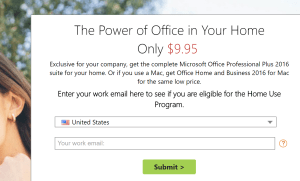 You will then be directed to open your email and will find your instructions to purchase. GREAT deal…Enjoy!