Hi everyone!

I spent an incredible four days with teachers from all over the country this past weekend. Besides creating Common Core lessons, the focus of the weekend was on the power of community building. We were so impressed by the following video and then blown away when Caine and Nirvan entered the room. Caine is in the fifth grade and has made such an impact on so many through the creation of an arcade with the cardboard boxes from his dad’s auto parts store. He is adorable! When he was asked, “So Caine, what’s next?”, he shrugged his shoulders and said “sixth grade?” He is a normal boy who has had an incredible impact on so many but he has remained himself – an adorable child with an imagination. Enjoy this video – you may want to share with your students.
Creativity without Technology
8 05 2013Comments : Comments Off on Creativity without Technology
Categories : Uncategorized
And THAT’S what teaching is all about… Fran Rosen
29 04 2013
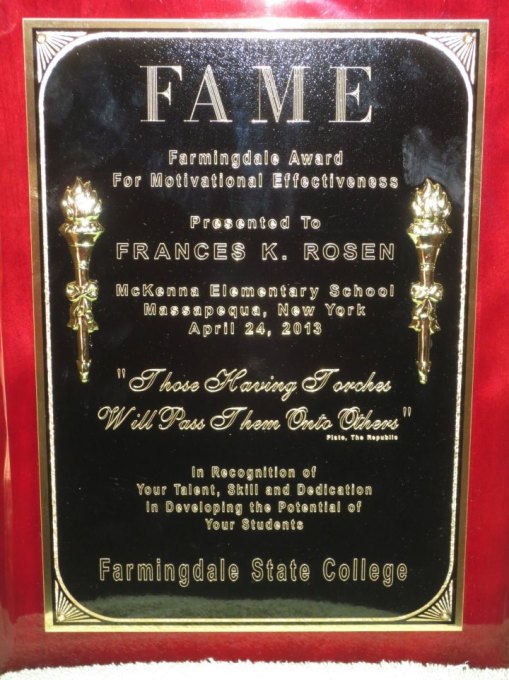 In my mind, the recognition a teacher receives from students is the most valuable. Fran Rosen received just that kind of recognition and was honored with Farmingdale State College’s FAME award (Farmingdale Award for Motivational Effectiveness). Each year students graduating from Farmingdale may nominate a teacher who they believe should receive the “Student Award for Academic Excellence”. Michael P. was a student in Fran Rosen’s elementary classroom. In his essay nominating Fran, Michael stated, “Mrs. Rosen gave me the basic foundation needed to succeed. She taught me that organization, accountability and communication skills define me as a person. I can only hope that someday I can have an impact on someone’s life like Mrs. Rosen’s impact on mine.”
Fran is a teacher in the special ed department at McKenna and unfortunately Massapequa will lose her to retirement this year. We congratulate her for being a motivating force in her students’ lives. And THAT’S what teaching is all about…
Comments : Comments Off on And THAT’S what teaching is all about… Fran Rosen
Tags: awards, fame award
Categories : Uncategorized
Video Editing, Lesson Plans and a Virtual “WebShelf”
4 04 2013
Hi everyone!
Hope you had a relaxing break. I know I did! I have a few things I’d like to share with you today.
First – the good news – teacher centers are IN the budget for next year. I haven’t worked out the details yet as to when MTRACT will be open but we will have money to provide you with services.
Second – hate writing lesson plans? Here’s a new FREE web 2.0 tool that can help
This is Common Curriculum from Common Curriculum on Vimeo.
Third – Looking for APPROPRIATE video for your lesson?
Take a look at Watch, Know, Learn for pre-screened video you may download for FREE
Fourth– Video Editing Made Easy, FREE and in the Cloud!
And FINALLY…VERY INTERESTING – Do you PIN? Well, EdShelf seems to be the educational equivalent. You can create your own shelves or take a look at what other teachers have already found beneficial on their shelves. It’s pretty terrific and, of course, FREE. Click on the link and take a look!Ed Shelf
Comments : Comments Off on Video Editing, Lesson Plans and a Virtual “WebShelf”
Categories : Video, Web 2.0 Tools
Academic Vocabulary with Pixton and Gooru – An Educational Search Engine
12 03 2013Hi everyone,
Academic Vocabulary
We have two words outside our doors throughout McKenna each week with their definitions. Take a look at what Tim Gill did with “assume” using Pixton, the FREE comic maker I told you about. Click on the link below the image to see the rest of the comic.
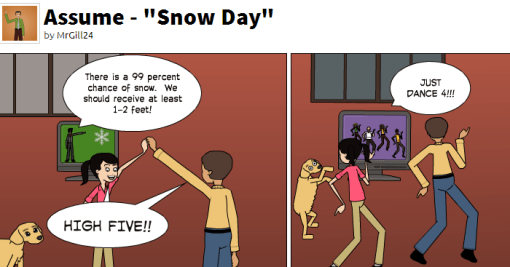
http://Pixton.com/ic:jvh4t87q
Don’t forget about the contest using Pixton and reporting on an invasive life species. Let me know if you need any help! Thanks Tim for sharing your creativity with us
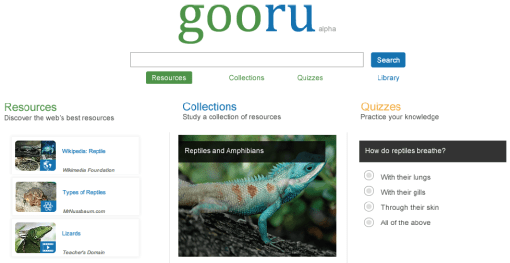
Tired of googling a topic that you are about to teach and then spending however long to filter through what would not be appropriate for education?
Try gooruing instead! Take a look at the search engine for education called gooru sponsored by the Hewlett Foundation, Cisco, pd, ONR, Google, Ram Shriram Family Foundation, Pearson, and Next Generation. It is also an APP – you can find it for your iPad or in the Google Marketplace.
I’ve embedded a video with information about it below.
This is not just a search engine – it’s a community of teachers and students. Go to goorulearning.org and explore. Join the community.
Stonybrook Classes
And speaking of Google, Stonybrook is offering three courses leading toward the Google Certified Trainer certification. These courses are graduate and work for your 175 hours. I will send the paperwork as soon as I get it. In addition, let me know if you are interested in the Education Computing Certificate. This can be extended for a masters program. Our Ed Leadership program will not begin until the fall.
BOOKS FOR FREE:
Cooperative Discipline
Student Brains, School Issues – A collection of articles
Creative Controversy
Blueprints for Achievement in the Cooperative Classroom
Brain Compatible Learning
Project T.E.A.C.H.
Teaching the Skills of the 21st Century
Enjoy,
Barbara
Comments : Comments Off on Academic Vocabulary with Pixton and Gooru – An Educational Search Engine
Categories : Search Engines
Pixton Cartoon Maker (WRITING TOOL), Encyclopedia of Life and the Professor Garfield Contest
21 02 2013Hi everyone,
TIRED OF POWER POINT??? TAKE A LOOK AT PIXTON!
 Take a look at the new FREE cartoon maker at the Professor Garfield website. There is a premium version but the free does PLENTY! What a great way for students to write a report on some assigned topic or LOTE students to create a conversation.
I’ve linked two videos below to show just what Pixton can do. Click on the URL below to see them. Michael Draper – you will LOVE this!
http://profgcontest.nyittbls.org/home/video-tutorials-from-pixton
************************************************************************************************************************************************************
Another site for SCIENCE teachers is the Encyclopedia of Life (http://eol.org), a free online resource about all life on Earth that offers text, images, video, sounds, maps, . . . Watch the video for a 2 minute clip
This is a real community of sharing supported by many including the Smithsonian Institute and Harvard University.
************************************************************************************************************************************************************
To introduce you to these wonderful resources, NYS Teacher Centers, NYIT, Professor Garfield and EOL are sponsoring a contest for grades 6 through 8. 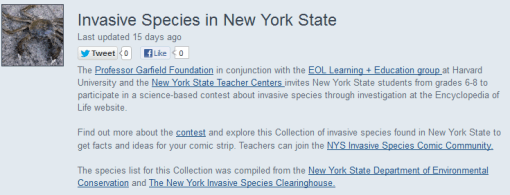
Students will visit the Invasive Species of New York State Collection on EOL at http://eol.org/collections/33844 to choose an invasive species in our area and then create a 6 to 9 panel comic in Pixton. I’ve attached a PDF Encyclopedia of Life Contest with further information as well as the rubric. Entries MUST be submitted to me by May 1!!!
PRIZES for students in each grade level
First Place – Apple iPad Mini
Second Place – Google Nexus Tablet
Third Place – Kindle Reader
There is a website as well – click to go to http://profgcontest.nyittbls.org/home/new-york-state-teachers
Enjoy – as always if you need help, give me a call or email me 🙂
Barbara
Comments : Comments Off on Pixton Cartoon Maker (WRITING TOOL), Encyclopedia of Life and the Professor Garfield Contest
Categories : Health, LOTE, Science, Uncategorized, Web 2.0 Tools, Websites for your Classroom
Digital Learning Day Is HERE!
6 02 2013 Hi everyone and welcome to Digital Learning Day!
Can you imagine a day where there is no paper, no pencils, and all teaching and learning is digital?! Of course you know how I feel about that! I would imagine a classroom filled with engaged students and a teacher who actually has time to TEACH!
One school uses stations – there are individual, teacher-led and collaborative learning stations. Take a look – I promise that you will be inspired. Click here to visit Alliance Education
CONGRATULATIONS to Anne Nardone and Julie Rogers. Their video submission is one of the Digital Learning Day winners and can be found by clicking here.
In conjunction with Digital Learning Day, teacher centers will be offering various webinars and announcing a contest for sixth, seventh, and eighth graders. Students will use the Encyclopedia of Life to research an invasive species in our area and then create a comic using Pixton at the Professor Garfield site. I will be joining Bob Levy and Clive Goodinson to announce the contest and provide details at 2:30. You can join us by clicking here. By the way, prizes include an iPad Mini, Google Nexus tablet, and Kindle Reader.
For information and links to all of our webinars, click here.
Have a great day!! See you online,
Barbara
Comments : Comments Off on Digital Learning Day Is HERE!
Categories : Uncategorized
APPR and Common Core
29 01 2013Hi everyone,
I’ve updated the APPR and Common Core pages for you.
APPR

You will find Overview and Evidence Binder pages as shown above. I added the Danielson rubric in an 8 1/2 x 11 size because I think it’s an easier read. I also updated the old headings to reflect the current APPR categories. You can download a copy from here.
Common Core

You will find Common Core Facts, ELA, and Math pages as shown above.
Common Core Facts Page
I added downloads recommended by NYSUT for Elementary, Secondary and Counselors. The documents were written to guide administrators and NYSUT believes them to be valuable resources to all.
I also added downloads for Evidence Guides that are on the EngageNY website. These guides can be used in your planning as they illustrate what is being looked for with regard to the Common Core in your lesson.
EngageNY has begun adding lesson modules to the site. You will find a link to that page. For those who need the 175 hours, consider working with colleagues on a collegial circle. You will find the directions on our site under Courses.
Common Core ELA Page
Ive added a lesson series from teaching channel on persuasive speech addressing Common Core Standards ELA.SL.8.3, 4 and 5.
Common Core Math Page
I’ve added links to some really great sites for worksheets (Common Core aligned – thank you to Kathy Voigt on this) and lessons on Number Sense from the Teaching Channel
Remember with so many changes, you have a great deal on your plate this year. There is no need to re-invent the wheel. There are so many resources available. I will continue to attempt to highlight the better ones for you.
Barbara
Comments : Comments Off on APPR and Common Core
Categories : APPR, Common Core
EdCanvas – a presentation tool
16 01 2013Hi everyone,
I have been playing with a new kind of presentation tool that is FREE and I believe has great potential. In order to show you some of what can be done, I created a presentation about Sandy on Long Island. My girlfriend now lives in Florida and has asked me on more than one occasion to send her news articles about Long Island because not much was reported about us – most of the information relayed was about the city.
Once you create an account (all they need is your email and password) then you can begin to search the topic you would like to create your canvas about. I typed in Sandy on Long Island and was then able to choose from You Tube videos, Flickr photos, Google photos and web search. I can also insert a label for text, enter a specific URL, upload a file. When I uploaded a Powerpoint, it was automatically converted to a Google Doc and displayed.
My mind is moving a mile a minute thinking about what can be done with this tool. How about a group project where students place “their” piece in a square. They can literally upload ANYTHING…Animoto, Prezi, Word, Powerpoint, …
Oh, and by the way, you can post your EdCanvas to Facebook as well as tweet it, share the link, or embed the code! Take a look – you will LOVE, LOVE, LOVE this!
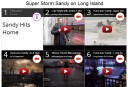
Click to see the complete Sandy on EdCanvas
Comments : Comments Off on EdCanvas – a presentation tool
Tags: presentation tool
Categories : Art, Business, English, Health, LOTE, Math, Motivation, Music, Science, Social Studies, Web 2.0 Tools, Websites for your Classroom
Digital Learning Day, Business and Health Websites
4 01 2013Hi everyone and welcome back to a NEW year and hopefully a great one!
Don’t forget to sign up for the second annual Digital Learning Day on February 6th. For more information and FREE registration click here.
Also, contact me if you’d like to submit a 2 to 3 minute video on how YOU integrate technology into your classroom. As a reminder, the website for this contest information can be found here.
Through Technology Tidbits and Tech4Teachers, I’ve found a couple of sites that Health and Business teachers may be interested in.
HEALTH Department
Here’s an iPad app “The Miracle of Life” I think you’ll find worthwhile. The video will give you an idea of how it can be used in your classroom. Remember MTRACT has iPads you may borrow.
BUSINESS Department
Remember Atari? Here’s a typing game that I believe the kids will enjoy. It is Space Game Defense – words fly down in attack and children (or adults – I had some fun playing as well – ask Trish Kanavy, she caught me!) must type the word in order to shoot it down before it reaches their base. The game can be found at http://www.digitalraiders.com/node/8
Happy New Year!
Barbara
Comments : Comments Off on Digital Learning Day, Business and Health Websites
Categories : Business, Health
Digital Learning Day, Internet Safety and a Persuasive Essay Web 2.0 Tool
18 12 2012Hi everyone!
The second annual DIGITAL LEARNING DAY is scheduled for February 6, 2013. NYS Teacher Centers have partnered with NYIT in encouraging teachers to submit a 2-3 minute video illustrating how they are using technology to transform classroom practice and help students meet Common Core Learning Standards. Teachers who submit a video could win a $50 Amazon Gift Card For more information, visit the NYIT website here
I learned about the following government website called OnGuard Online for online safety. It’s not only a good resource for your class, it’s a great resource for us as well. Click here to visit.
Another really cool site, called SCAN, is a 2.0 tool to help guide discussion and learn to respect other’s opinions. There’s are several PDFs that can be downloaded for handouts. I’ve attached the SCAN Persuasive Essay for your review. SCAN_Persuasive_Essay
Here’s a video explaining the site. There is a free and a subscription version. If you choose to subscribe, the price would be $45 per year.

Have a wonderful Christmas, Hanukah, and New Year!
Hope it’s relaxing – you deserve it!
Barbara
Comments : Comments Off on Digital Learning Day, Internet Safety and a Persuasive Essay Web 2.0 Tool
Categories : English, Internet Safety, LOTE, Social Studies, Uncategorized, Web 2.0 Tools, Websites for your Classroom

 M-TRACT